What's New [FortiMail Browser Security]

Here's what's new in the FortiMail Browser Security browser extension...


● To see what's new in FortiMail Workspace Security, see What's New

Released features

Release Date

Here's what we added or changed...

20 August 2025

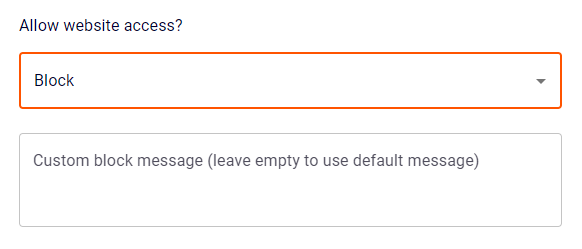
  • Adding custom links to custom block/warn messages: When you configure a website rule, you can now show a link under each custom block or warn message. You specify the "link text" and the "link URL". This feature enables you to show a customized link for each website rule in a policy.

    Note: The custom message "link text and URL" controls appear only if either the Block or Warn options is selected for the Website access option.

    For details, see Link for custom warn/block message.

20 August 2025

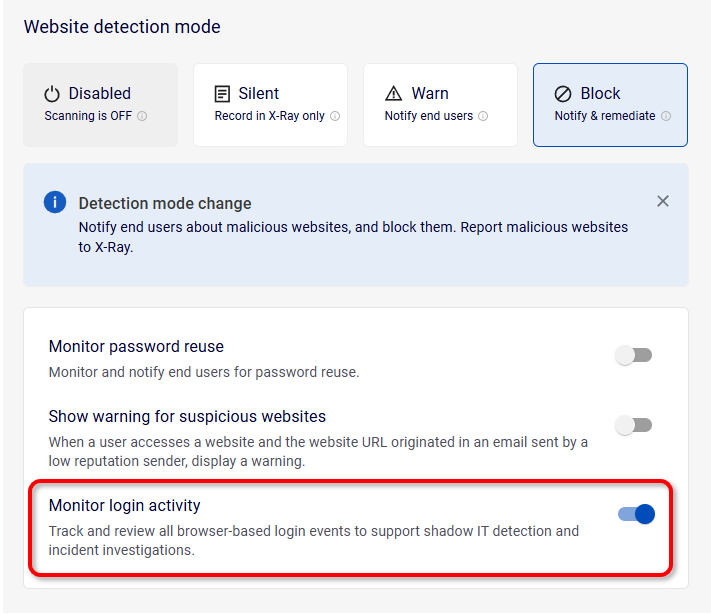
  • Monitoring login activity: You can now configure whether-or-not FortiMail Browser Security will record browser-based login events. Login events are recorded in the events log, and displayed in the Events page. Each login event has the following Activity: "User logged in to website".

    To access the new configuration, go to Policies > Policies, select the required policy, and then in the Detection Settings tab, scroll down to the Website detection mode section. For details, see Monitor login activity.

25 May 2025

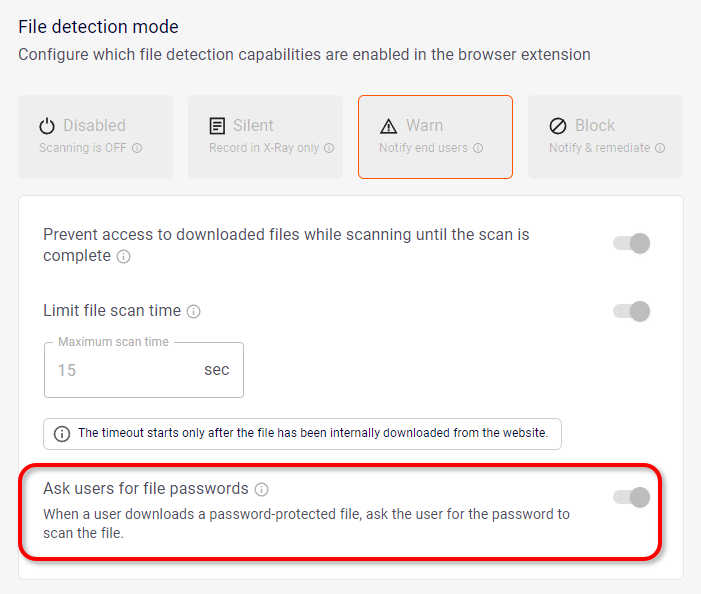
  • Asking users for passwords for encrypted files: You can now configure the browser extension to ask users for passwords for encrypted download files. This enables the encrypted files to be scanned for malicious content. You can enable the new functionality under Policies > Global Rules > File detection mode. For details, see Ask users for file passwords.

8 May 2025

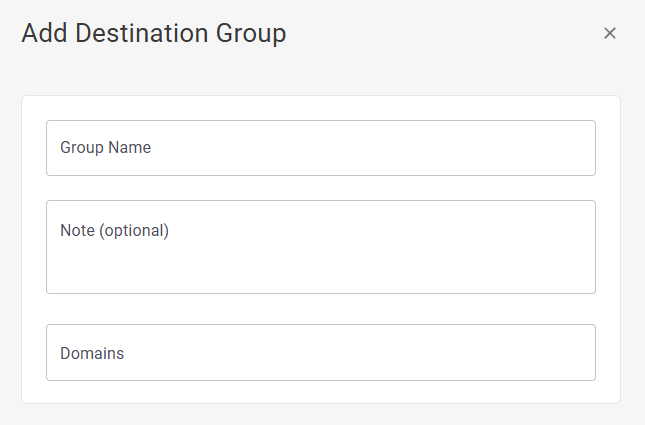
  • Destination groups: You can now create and configure destination groups. Each destination group that you create contains a set of multiple domains, also known as destinations. Configuring destination groups enables you to add and manage multiple domains as a single entry in website rules, to thereby simplify the creation and maintenance of website rules. Website rules that use destination groups are called group-based website rules. For details, see Destination Groups.

7 April 2025

  • Extension rules based on extension store: You can now add extension rules based on the store from which the extension was installed. This lets you disable extensions that originate from an Unknown Source, and not from the Official Marketplace. For details, see Extension Store.

4 March 2025

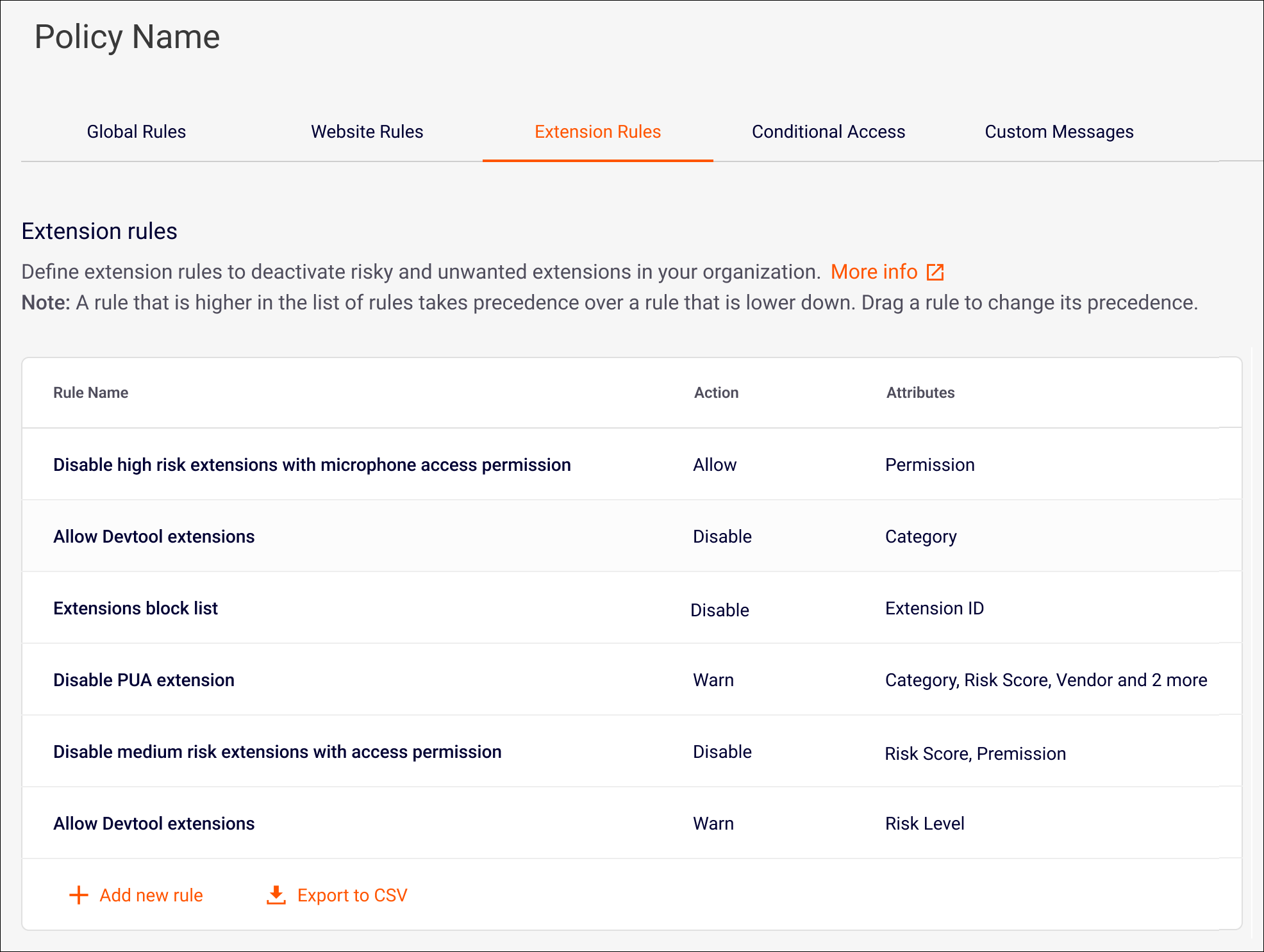
  • Extension rules based on extension permissions: You can now add extension rules based on the permissions that are required by an extension. For details, see Extension rules.

4 March 2025

  • Multiple conditions in extension rules: You can now include multiple conditions in extension rules. For example, you can create a rule that disables all extensions that have a high risk score AND that require specific permissions. For details about extension rules, see Extension rules.

19 January 2025

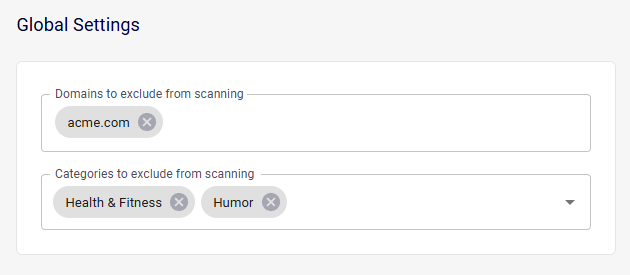
  • Excluding domains from scanning: You can now specify the domains that will be excluded from scanning. When a user tries to access a web-page that is in one of the specified domains:

    • The web-page will not be scanned for malicious content, and the user will be permitted to access the web-page.

    • Files that are downloaded from that web-page won't be scanned for malicious content.

    • Website rules and detection settings will NOT apply to these domains.

    To specify the domains to exclude from scanning, go to Settings > General settings, and then scroll down to Global Settings. For details, see Domains to exclude from scanning.

12 January 2025

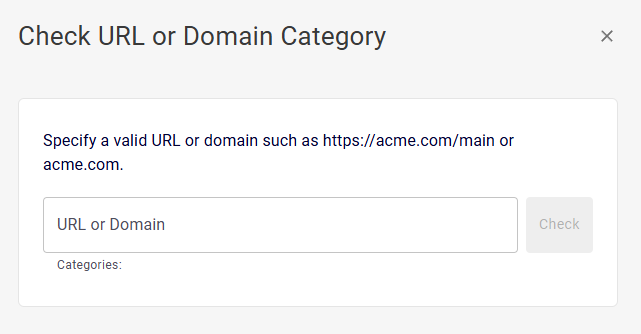
  • Checking categories: You can now check what categories are associated with specified URLs or domains. This is useful when you want to add a category to a website rule, but you are not sure what categories are associated with a specific domain. For more details, see Checking associated categories.

12 January 2025

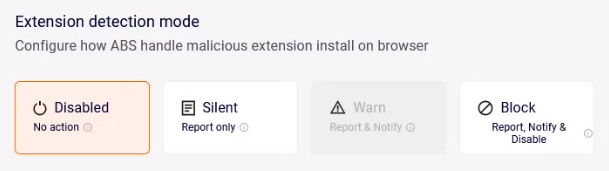
  • Extension deactivation rules - risk level: You can now define extension deactivation rules that are based on the risk-level of the extension. This is in addition to the extension-ID-based rules that were previously available. The new risk-level-based deactivation rules will deactivate risky and unwanted extensions in your organization. For details on extension deactivation rules, see Extension rules.

3 January 2025

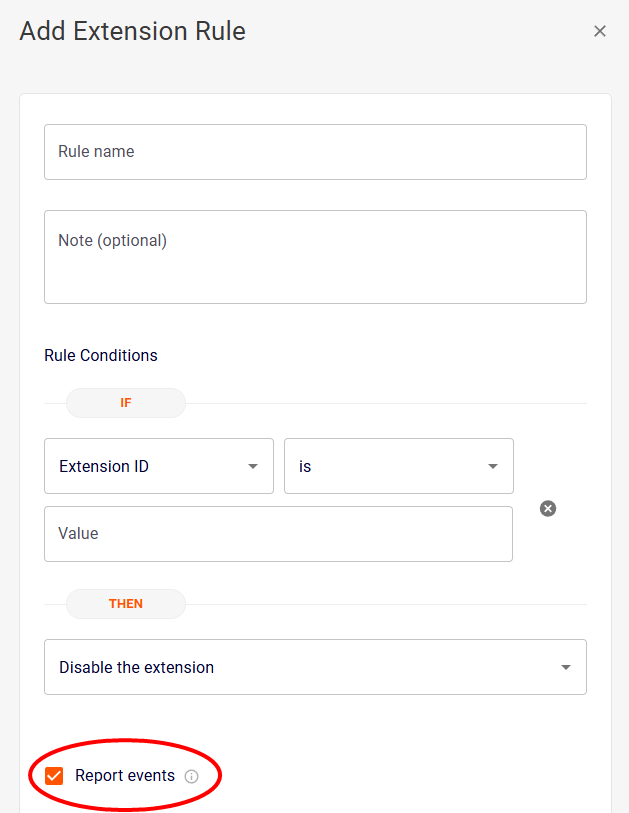
  • Reporting events that are triggered by extension deactivation rules: You can now specify whether or not to send events that are triggered by a particular extension deactivation rule to the following:

    • the Extension Activity page in the FortiMail Browser Security console

    • the Events page in FortiMail Workspace Security

    • SIEM integrations

    Selecting to not send events that are triggered by a particular extension deactivation rule is typically done for privacy reasons, so that there is no record of extensions that have been disabled due to applied policies. For further details, see Extension rules.

15 December 2024

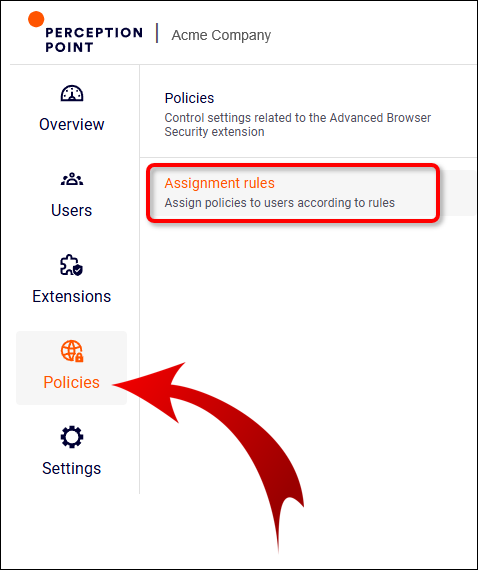
  • Assignment rules moved to Policies menu: We've moved the Assignment Rules page from the Settings menu to the Policies menu. The functionality of the Assignment Rules page remains unchanged. For details on policy assignment rules, see Using rules to assign policies.

11 December 2024

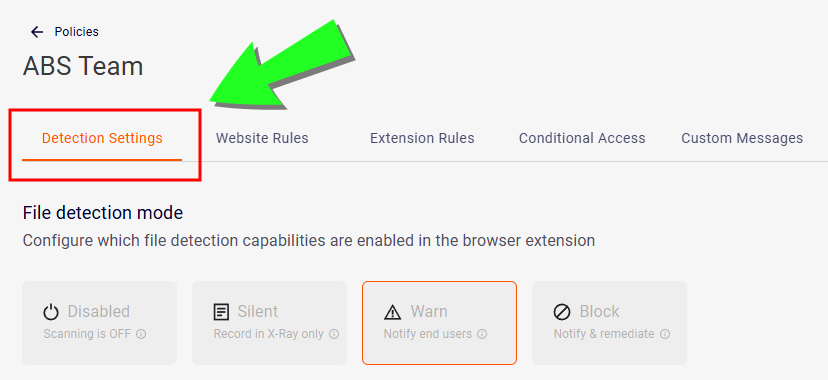
  • Renaming " Global Rules" to "Detection Settings": In the Policies page, we've renamed the Global Rules tab to now be called the Detection Settings tab.

1 December 2024

  • Excluding categories from scanning: You can now select the categories that will be excluded from scanning. When a user tries to access a web-page that is in one of the selected categories, the web-page will not be scanned for malicious content, and the user will be permitted to access the web-page. To select the categories to exclude from scanning, go to Settings > General settings, and then scroll down to Global Settings. For details, see Categories to exclude from scanning.

1 December 2024

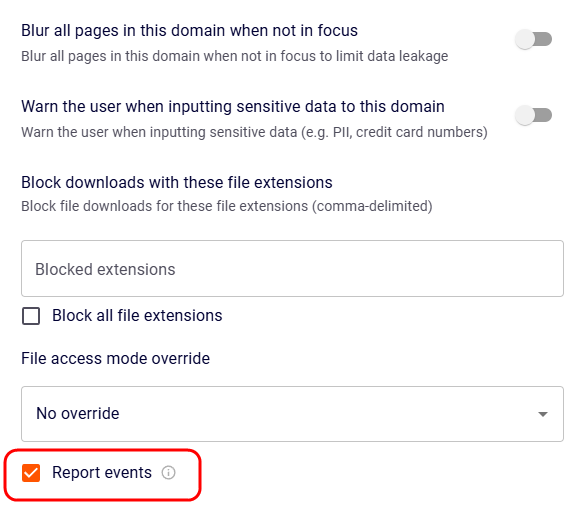
  • Reporting events that are triggered by website rules: You can now specify whether or not to send events that are triggered by a particular website rule to the following:

    • the Extension Activity page in the FortiMail Browser Security console

    • the Events page in FortiMail Workspace Security

    • SIEM integrations

    Selecting to not send events that are triggered by a particular website rule is typically done for privacy reasons, so that there is no record of users accessing sites in specified domains or website categories. For further details, see Website Rules.

18 November 2024

  • Showing the Device Name in the Extension Activity log: You can now see the device name for each entry in the Extension Activity log. This helps you to identify the device on which the event occurred. The device name is displayed in the table [log] and also in the Event Details view. You can see the new device name information under Users > Extension Activity. For details about the Extension Activity log, see Events Page.

10 September 2024

  • Extension deactivation rules: You can now define extension deactivation rules in policies. These rules will deactivate risky and unwanted extensions in your organization. Deactivation is based on the extension ID. For details on extension deactivation rules, see Extension rules.

14 August 2024

14 July 2024

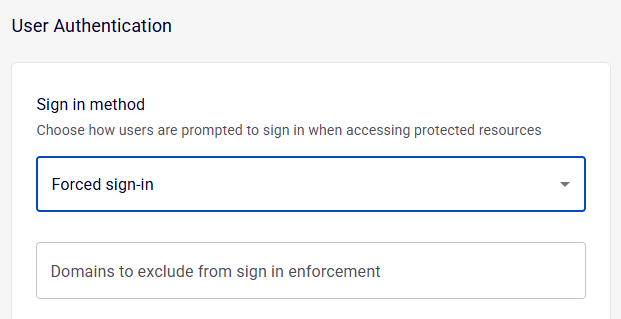
  • Forcing users to activate the extension: You can configure FortiMail Browser Security so that the user of a browser will not be able to access any URLs until the extension is activated. This forces the user to sign-in to activate the extension. When a user with an unactivated extension tries to access any URL, the user will be redirected to a sign-in page. After the user successfully signs-in to activate the extension, the user will be redirected to the page that was originally requested.

    For details on how to implement this feature, contact FortiMail Workspace Security Support [support@perception-point.io].

30 June 2024

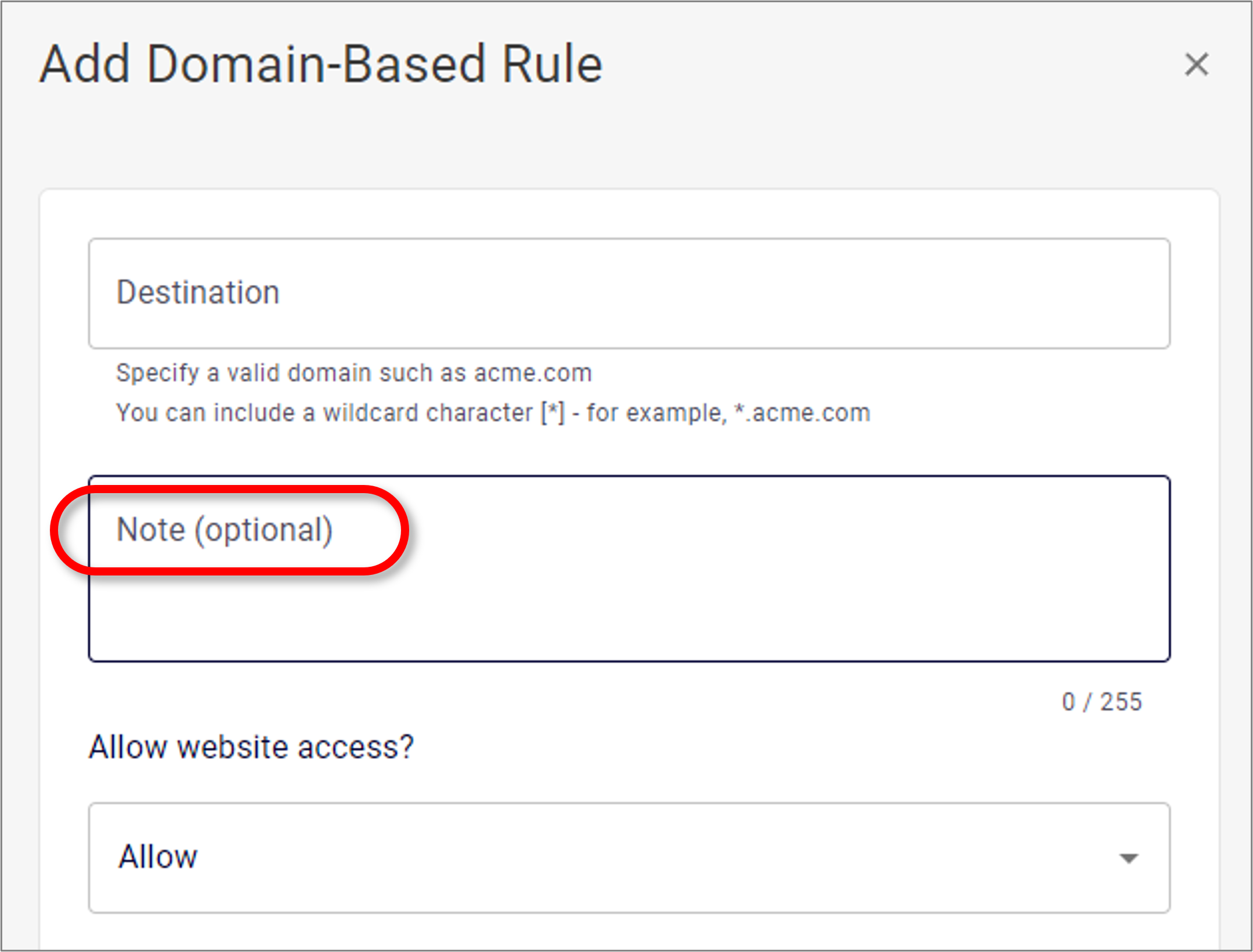
  • Adding notes to website rules: You can now add [optional] notes to website rules. Notes may be useful, for example, to record when and why a change was made to a website rule. For details, see Website Rules.

30 June 2024

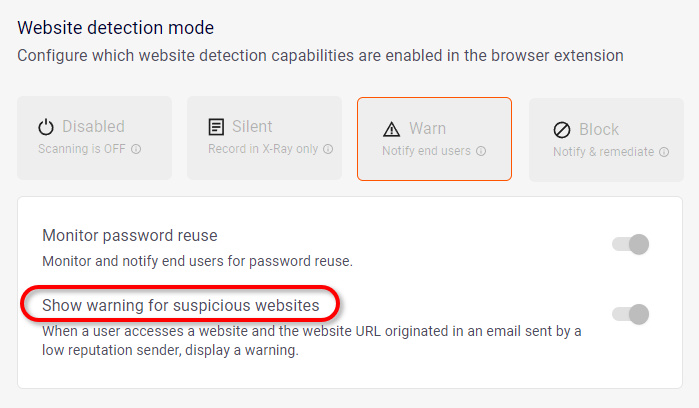
  • "Show warning for "suspicious websites" in Warn mode: The "Show warning for suspicious websites" setting is now available in Warn mode - in addition to Block mode, which was previously available. For details, see Website detection settings.

14 June 2024

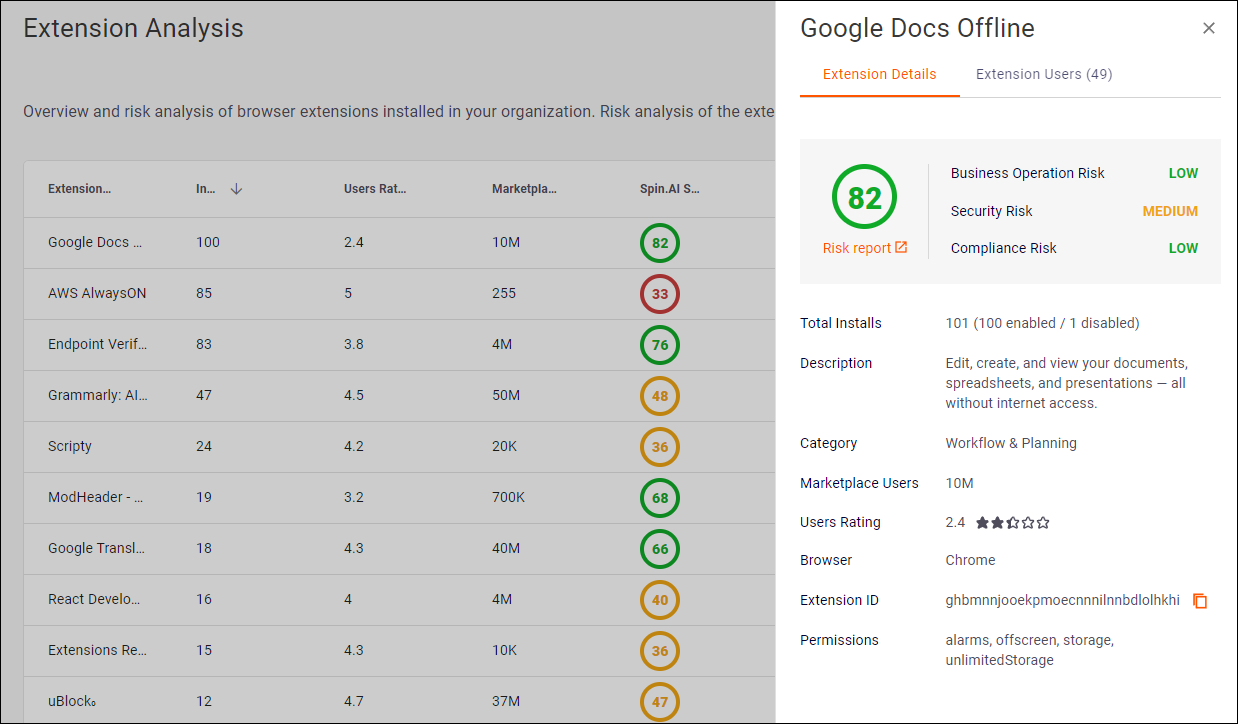
  • Additional details displayed for installed extensions: When you display the Extensions > Extension Analysis page, you can now click any extension in the list of extensions - to show additional details about the extension. The additional details are shown in two tabs that appear in a new pane that opens: Extension Details and Extension Users. For details, see Managing 3rd-Party Extensions.

4 June 2024

  • Third-party extension block list: You can now prevent extensions from being enabled, based on the spin.ai risk value of the extension. For assistance with implementing this feature, contact your Customer Success representative at Perception Point. For details, see Risk level - policy enforcement.

4 June 2024

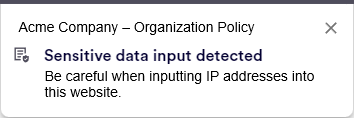
  • Detecting input of sensitive data into websites: You can now configure Advanced Browser Security to detect when an end-user enters sensitive data into a website, and to then warn the end-user about the potential dangers. You can configure the detection of entry of sensitive data into websites in the PoliciesWeb Rules page. For additional details, see Detecting input of sensitive data into websites.

    For information about how to implement detection of sensitive data into website, contact FortiMail Workspace Security Support [support@perception-point.io].

14 May 2024

  • Conditional Access is now available: If you are using SAML integration with your SaaS apps, you can now require that the Advanced Browser Security extension be activated on all browsers that are used to access specified sites. This is done to enhance security on those sites. For details, see Conditional Access Integration.

14 April 2024

  • New "Deployment options" page: In the FortiMail Browser Security console, the deployment tools have been moved from the toolbar to the new Deployment options page. You can find the Deployment options page under Settings > Deployment options. The available deployment options have been restructured and refined. For details, see Deploying the extension [Managed deployment].

14 April 2024

  • Detecting sensitive file downloads: You can now configure ABS to issue an alert when a significant number of files that contain sensitive data is downloaded. This DLP functionality helps to detect inside threats within your organization. For additional details, see Detecting sensitive file downloads.

    For information about how to implement detection of sensitive file downloads, contact FortiMail Workspace Security Support [support@perception-point.io].

2 April 2024

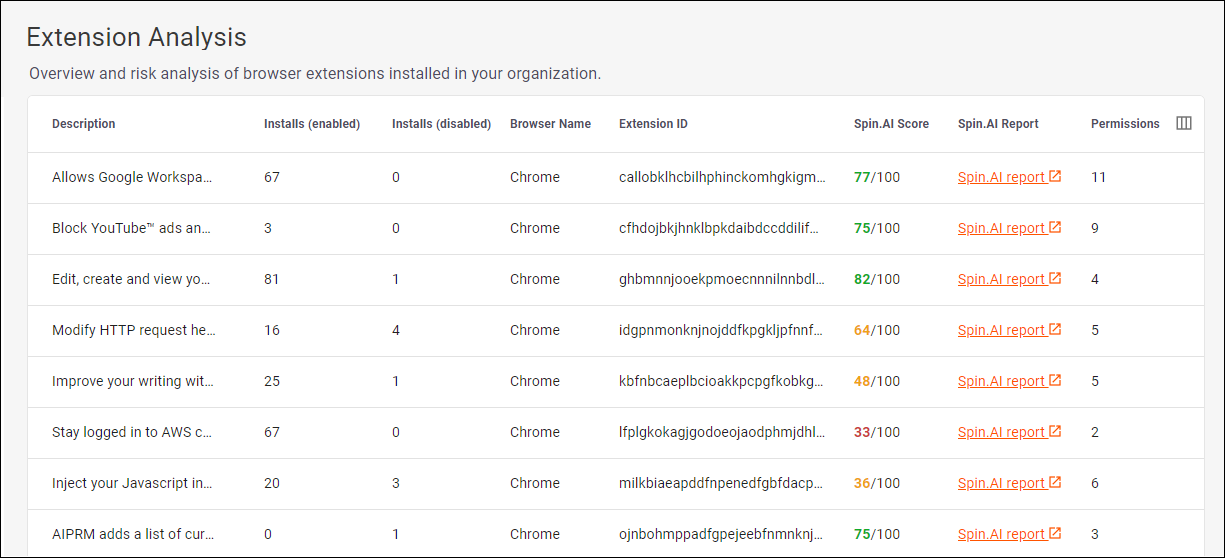
  • Details about third-party extensions: The New Extensions > Extension Analysis page shows administrative information about the third-party extensions that have been installed on end-user devices in your organization. The displayed information includes the number of browsers on which each extension is enabled, a spin.AI risk score and a spin.AI report for each extension. For details, see Managing 3rd-Party Extensions.

2 April 2024

  • Third-party extension block list: You can now create a "third-party extension block list" that includes the IDs of all third-party extensions that should not be enabled in your organization. Users will be blocked from enabling extensions that are included in this block list. For assistance with implementing this feature, contact your Customer Success representative at Perception Point. For details, see 3rd-Party Extensions - Enforcing policy.

2 April 2024

  • Recording events performed on 3rd-party extensions: The ABS extension now records events that are performed on 3rd-party extensions. These events are included in the Extension Activity log in the FortiMail Browser Security console. The Extension Activity log includes the following events that relate to 3rd-party extensions: installation and un-installation, enabling, updating, and deletion. Go to Users > Extension activity to display the Extension Activity log. For further details, see Events Page.

25 February 2024

  • Blurring website pages that are not in focus: You can now add website rules that will blur all pages in the specified domain or category when these pages are not in focus. This helps to limit information leakage to nearby people who should not have access to information in these websites. This feature is also referred to as an inactivity mask. For further details, see Website Rules.

18 February 2024

  • Updated website category names: We've updated the names of certain website categories to more industry-standard names. If you have incorporated website category names into any of your category-based website rules, you may need to update the category names in the rules to the new names. Contact your FortiMail Workspace Security Customer Success manager to get a list of category mappings.

28 January 2024

  • Deactivating Advanced Browser Security from X-Ray: You can now deactivate FortiMail Browser Security from inside X-Ray. This new functionality is available in the Account > Channels page.

    When you deactivate Advanced Browser Security, all extension-side functionality will be inactive. This includes:

    • Website/file malware detection will be in disabled mode.

    • Website rules will not take effect.

    • Anti-tampering will not operate.

    • Upload auditing will not operate.

    For further details, see Website Rules.

28 January 2024

  • New "Generative AI" website categorization: The "Generative AI" category is now available when we categorize websites. This enables you to implement specific website rules that will apply to Generative AI websites. For example, you could create a website rule to totally block access to Generative AI websites, or alternatively, warn users about the possible danger of sensitive data leakage when using Generative AI websites.

21 January 2024

  • Added Firefox support to the deployment scripts: We've added Firefox support to the deployment scripts [Windows and MacOS] for the extension. The deployment scripts now include support for Google Chrome, Microsoft Edge, and Firefox. For details on the deployment scripts, see Extension installation scripts.

3 January 2024

  • Download scanning in Firefox: Scanning of downloaded file is now supported in Firefox.
    Note:

    • Regular downloads are scanned for malicious content; downloads that originate from blobs, file URLs, or data URLs aren't scanned for malicious content. For details on what features are now supported in Firefox, see Browser Support Matrix.

    • In some scenarios, enabling the "Prevent access to downloaded files until the scan is complete" setting doesn't prevent access to the downloaded files before the scan is complete. [See Prevent access to downloaded files until the scan is complete] In these scenarios, if the downloaded file is found to be malicious, the extension will attempt to delete the malicious downloaded file.

19 December 2023

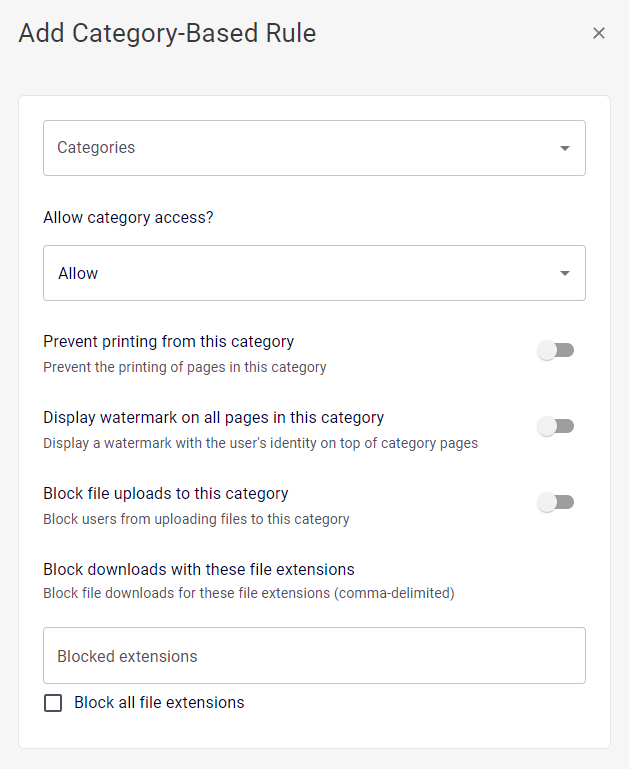
  • More options for category-based website rules: We've added the following options that you can now configure when you add category-based website rules:

    • Preventing printing

    • Displaying watermarks

    • Blocking file uploads

    • Blocking the downloading of specific file types

    For details, see Adding category-based website rules.

17 December 2023

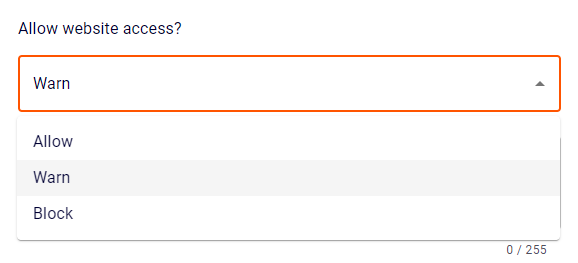
  • New "Warn" option for website access: When you configure a website rule [Policies > Website Rules], you can now specify the "Warn" option for website access. When the "Warn" option is specified, when a user tries to access a "warned" website, a warning message will be displayed. The user can choose to either adhere to the warning [and not proceed to the website], or to dismiss the warning and then access the website. This can be useful, for example, if you want to show the user some corporate policy before granting access to a website. For details, see Access to domain/category/group.

17 December 2023

  • Custom message for blocked and "warned" websites: When you configure a website rule [Policies > Website Rules], you can now specify custom text that will appear when a user tries to access a blocked or a "warned" website. The custom text will replace the default text. A custom message can be useful for presenting specific warnings or corporate policy information related to a specific website (for example, a Generative AI website) or category. For details, see Custom block/warn message.

4 December 2023

  • Overriding the file download access mode: For a specified domain, you can now override the file download access mode that is configured in the Detection Settings tab of a policy. The override is configured in the Website Rules page. Overriding the file download access mode may be useful, for example, for trusted websites in which a scan can happen retroactively after the file is made available to the user, or for extra risky websites in which a full long scan is required before letting the user access the file. For details, see File access mode override.

26 November 2023

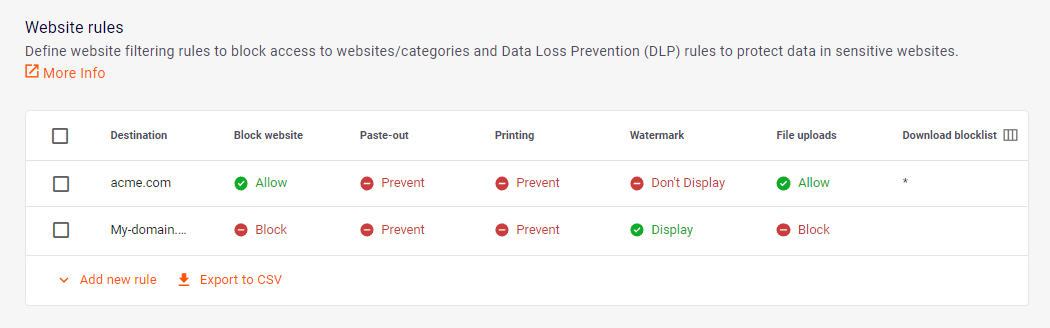
  • Defining all domains in website rules: When you configure a website rule, you can now enter a lone wildcard character [*] to define the destination. A lone wildcard character represents all domains. This lone wildcard character functionality is currently applied to the actions listed below - and it is ignored by all other action types that are included in the rule:

    • Block file uploads

    • Block printing

    • Block downloads

    • Add watermark

    For details on how to configure website rules, see Website Rules.

26 November 2023

  • Recording file upload attempts: You can now configure FortiMail Browser Security to record all user attempts to upload files - in the "Extension Activity" log. Both successful and unsuccessful attempts are recorded. Configuration is performed in the Policies > Global Rules page. For details, see Events Page.

26 November 2023

[Beta mode]

  • Conditional access: You can now ensure that users can access specific work-related web apps only when both of the following conditions are in place:

    • The extension is installed on the browser that is used to access the specific web app.

    • The user is signed-in to the extension.

    The conditional access functionality is still in Beta mode. For details, see Conditional Access Integration.

26 November 2023

  • Built-in policies: When FortiMail Browser Security is enabled for your organization, the following three built-in policies are now created:

    • Default Policy

    • Disabled Policy

    • Strict Policy

    For details on the default settings for each of the built-in policies, see Built-in policies. You can clone or modify any of the built-in policies.

13 November 2023

[upcoming feature]

  • Asking users for file passwords: You can now configure the file detection option so that when a user downloads a password-protected file, the user will be asked for the password to enable the file to be scanned. For details, see Detection Settings.

6 November 2023

  • Recording file upload attempts: You can now configure the data loss prevention options in the Website Rules tab so that when a user tries to upload a file, details of the upload attempt will be recorded in the Extension Activity log. Both permitted attempts and blocked attempts are recorded. For details, see Events Page.

6 November 2023

  • Specifying the sender display name in invitation emails: When you customize the invitation emails that are sent from the FortiMail Browser Security console to new users, you can now specify the sender display name that will appear in the email. This is in addition to the existing customization options that you can specify. For details, see User email invitation customization.

6 November 2023

  • Defining all domains in website rules: When you configure a File upload action in a website rule, you can now enter a lone wildcard character [*] to define the domain. A lone wildcard character represents all domains.

    Important: This lone wildcard character functionality is currently applied to File upload actions only - it is ignored by all other action types that are included in the rule.

24 October 2023

  • Console dashboard: You can now display a dashboard in the FortiMail Browser Security console. The dashboard lets you view system-level activity occurring in your FortiMail Browser Security implementation. Click Overview > Dashboard to display the dashboard. The dashboard shows information about:

    • Daily active users: The number of users that are active each day.

    • User policy: The quantity of each of the policies that are assigned to users.

    • Browser type: The types of browsers on which the extension is installed.

    • User lifecycle: The quantity of users in each user status.

    For details, see Overview.

24 October 2023

  • Customizing invitation emails: You can now customize the invitation emails that are sent from the FortiMail Browser Security console to new users. The customization includes:

    • Hiding the Perception Point logo that is included by default in the email body.

    • Customizing the text that will appear in the subject line of the user invitation email.

    • Customizing the text that will appear in the body of the user invitation email.

    For details, see User email invitation customization.

10 October 2023

  • Don't scan files with specified extensions: You can now configure the file detection options so that when a user downloads a file that has a specified extension, the file won't be scanned. This option is used to remove the requirement to scan files that are typically safe. For details, see Skip scans for safe file types.

10 October 2023

  • Downloading extension activity: You can now click the Export to CSV button in the Extension Activity page to generate and download a CSV file that contains the displayed extension activity.

26 September 2023

  • IdP integration for end users: You can now configure FortiMail Browser Security to enable end-users to use an external identity provider - such as Azure AD, Google Workspace, and Okta - to sign-in to the FortiMail Browser Security console. This SSO functionality makes it even easier to onboard new users of the Advanced Browser Security extension. For more information about IdP integration, see Identity Provider [IdP] Integration - SSO [FortiMail Browser Security].

26 September 2023

  • Facelift for the Website Rules page: We've given a facelift to the Website Rules page. There's now a side-bar that opens to simplify the process of adding a domain-based rule. And we've enhanced the UI of the rules table - to make the table more user-friendly. For more information about the Website Rules page, see Website Rules.

26 September 2023

  • Profiles replaced by Policies: To simplify the configuration of FortiMail Browser Security, we've replaced profiles with policies - and removed the concept of profiles and extension profiles from FortiMail Browser Security. All the required conversions will be performed by Fortinet - there is nothing required to be done by any of our customers. For more information about policies, see Policies.

4 September 2023

  • User email invitations: Admin users can now use the FortiMail Browser Security console to send email invitations to end-users. You can send multiple invitations at the same time. The invitations will invite end-users to install the browser extension and sign-in to it. This simplified user onboarding mechanism is typically useful in smaller organizations and PoC evaluations. For installation instructions, see Deploying the extension [Managed deployment].

21 August 2023

  • Auto-close developer tools: We've added anti-tampering functionality. You can now configure the extension so that it will attempt to close the browser's "Developer Tools" - if the tools are opened by an end-user. For further details, see Anti-tampering.

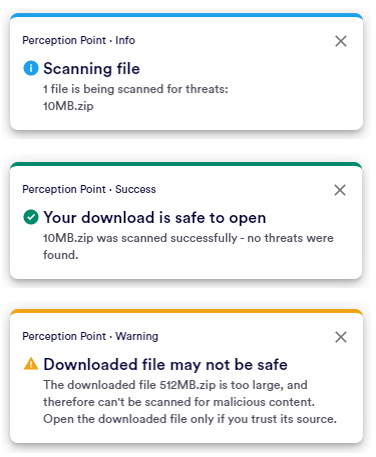
  • Custom user notification when a downloaded file is too large to be scanned: By default, downloaded files up to 100 MB in size can be scanned for malicious content - larger files are not scanned. You can now specify a custom message that will be displayed [in place of the default message] when a downloaded file is too large to be scanned. This functionality is included in the Custom Messages tab inside extension profiles. For further details, see Configuring custom messages.

14 August 2023

  • "Data Loss Prevention" tab now called "Website Rules" tab: When configuring extension profiles, we've renamed the Data Loss Prevention tab to now be called the Website Rules tab. We did this to accommodate the extra functionality that is being added to this page.

    In addition, the rule priority on this page now works as follows: A matching rule that is higher in the list of rules takes precedence over a matching rule that is lower down. For example, if rule #2 allows access to a specific website, and rule #5 prevents access to the same website, access to the website will be allowed.

    For further details, see Website Rules.

10 July 2023

[Extension version: 1.55.0]

  • Mac Shell scripts for automatic deployment of the extension: You can now download Mac Shell scripts that enable automatic deployment of the browser extension on MacOS devices. For details, see Organization tokens.

15 June 2023

  • Custom message for large files: Replaces the default message in the toast notification that appears when a downloaded file is too big to be scanned. For details, see Custom messages.

14 May 2023

  • Showing progress while scanning downloaded files: We have improved the user-experience provided by the toast notifications that appear while a downloaded file is being scanned. The toast notifications will show the specific task that is being performed, and an estimate of the task completion percentage.

4 May 2023

[Extension version: 1.40.9]

  • Adding links to custom messages: You can now add a link below the custom messages that appear in block pages. You specify the text of the link, and the URL that will open when the link is clicked. This functionality is included in the new "Custom Messages" tab inside extension profiles. For details, see Custom messages.

23 April 2023

[Extension version: 1.40.9]

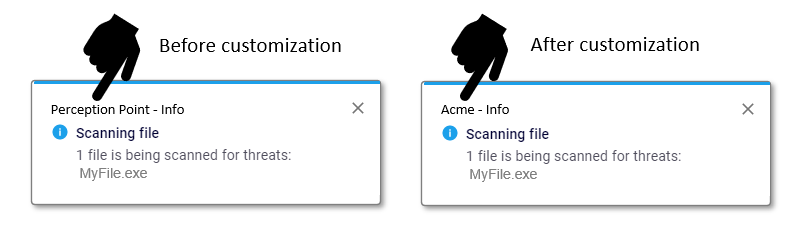
  • Customizing toast notifications: You can now display your organization's name in all toast notifications. This name will replace the default "Perception Point" in the notification toasts. For details, see General Settings.

11 April 2023

[Extension version: 1.40.9]

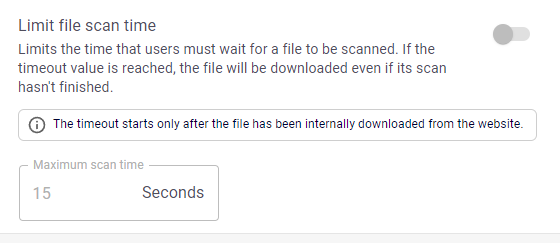
  • "Limit file scan time" is now available for Warn mode: The "Limit file scan time" setting is now available for Warn mode - when you configure the detection options in an extension profile. For details, see Extension Profiles.

4 April 2023

[Extension version: 1.38.10]

  • Preventing uploading to specific domains: The Browser Extension now lets you prevent uploading files to specified domains - to further improve the DLP functionality. For details, see Website Rules.

20 March 2023

[Extension version: 1.38.10]

  • New toast message design: We've updated the look of the toast messages that are displayed by the Advanced Browser Security [ABS] Browser Extension. We removed the Perception Point logo, and added icons to improve visual recognition of the message content. In addition, the toast messages are now color coded to make the meaning and significance of each toast immediately apparent to end-users.

6 March 2023

[Extension version: 1.37.4]

  • Accessing the Advanced Browser Security Console from inside X-Ray: You can now access the Advanced Browser Security Console from inside X-Ray - without the need to enter any additional user credentials. To access the console, hover over your name on the right of the X-Ray toolbar, and then select Browser Extension.

    Note that you can access the Advanced Browser Security Console only if Advanced Browser Security is enabled and activated for your organization - in Perception Point-X-Ray. For details, see the Perception Point Documentation Center.

27 February 2023

  • Logging downloaded files that couldn’t be successfully scanned: Each downloaded file that couldn’t be successfully scanned, now appears as an event in the ABS console [Users & Devices > Extension activity]. Files can’t be successfully scanned if they are too large or if they are password-protected. For details, see Events Page.

6 February 2023

  • Accessing download files before the scan is complete: It is now possible to configure whether or not users will have access to download files before the scan for malicious is complete. For details, see Prevent access to downloaded files while scanning.

23 January 2023

  • Blocking access to specified websites: In your data loss prevention [DLP] rules inside extension profiles, you can now block access to specified websites. For details, see Website Rules.

  • Showing extension activity: The new Users & Devices > Extension activity page lets you see a log of specific events that occurred on all devices on which the Browser Extension is deployed. The log includes events that relate to attempts to access blocked websites and attempts to download blocked files. For details, see Events Page.

  • Per-site upload control: Per-site upload control lets you block uploading to specific domains, or allow uploading to only specific domains. For details, see Controlling uploads.

  • Configuring which toasts to display: The Browser Extension uses toast messages to inform users of important events that occur when files are scanned to detect malicious content. You can configure which of these toast messages are displayed, and which toast messages are not displayed. For details, see Configuring which online user notifications to display.

9 January 2023

  • Limiting scanning time for downloads: You can now limit the time that users must wait for a file to be scanned. If the timeout value is reached, the file will be downloaded even if its scan hasn't finished. This limit applies to "inline" scanning only. For details, see Limit file scan time.

  • Defining data loss prevention rules: You can now define data loss prevention [DLP] rules inside the new Data Loss Prevention tab in the extension profiles. These rules help to protect data in sensitive websites and web apps. For details, see Website Rules.

  • Per-site download control - based on file extensions: We've added the ability to control file downloads based on the file extensions - on a per-site basis. For details, see Website Rules and Blocking downloads with specific file extensions.

26 December 2022

  • Automatic activation using a shareable link: We've added the ability to use a shareable link to install the Browser Extension. This greatly simplifies the installation process - where the user does not need to enter any credential during the process, such as an email address. See Organization tokens for details.

  • Adding a custom logo: You can now add your own logo. This logo will appear in place of the Fortinet logo - in the ABS block pages and the ABS toast messages that are displayed to end users. For details, see Custom logos.

  • Automatic activation of the Browser Extension - identifying users: If a user is not signed-in to the browser with a corporate email address, various algorithms will be used to try to identify the user. If the user is successfully identified, the identity that is found is used to create the new user. For details, see Organization tokens.

  • Monitoring login events: You can configure the Browser Extension so that an event is logged each time a user uses the browser to login to a website. You can then monitor the login events in the Events page in Perception Point X‑Ray. For details, see Monitoring website login events.

  • Support for right-to-left languages: We now support right-to-left languages for custom messages in malicious website and download block pages. For details, see Detection options.

12 December 2022

  • Opera and Brave browsers supported: The Browser Extension can now be installed with Opera and Brave browsers - with beta functionality. See Deploying the extension [Managed deployment] for a full list of supported browsers.

28 November 2022

  • Logging website logins: Each time a user tries to log-in to a website, this log-in action will now be included in the Events page in Perception Point X‑Ray. The logged events have the WebsiteLogin type. For details, see Monitoring website login events.

7 November 2022

  • Displaying a watermark: You can now configure FortiMail Browser Security so that a series of watermarks is shown in the user interface of any browser that is protected by the Browser Extension. You can specify the sensitive websites for which watermarks will be displayed. The watermarks identify the signed-in user. The watermarks will be visible in screen captures - thereby helping with data loss prevention [DLP] by deterring insiders from leaking data. For details, see Displaying watermarks.

  • Blurring out-of-focus websites: You can now configure FortiMail Browser Security so that websites that are not in focus will be blurred. This helps prevent accidental sharing of sensitive data with unauthorized people. For details, see Blurring websites.

24 October 2022

  • Inline download scanning: When the Advanced Browser Security extension is installed, the user does not have access to the downloaded file until the scan of the file is completed. For details, see Extension Profiles.

  • Per-site clipboard control: You can now use per-site clipboard control to control the copying that is allowed from specific websites - when the ABS Browser Extension is installed. For details, see Per-site clipboard control.

  • Per-site download control: Per-site download control lets you prevent downloading from specific domains, or allow downloading from only specific domains. For details, see Controlling downloads.

  • Per-site bypassing of scanning: You can now limit the scans that are performed when browsing using an Advanced Browser Security-protected browser. To limit the scans, you create a scan bypass listFiles that are downloaded from any site that is included in the scan bypass list are not scanned. In addition, all sites that are included in the scan bypass list are not scanned when they are browsed using an Advanced Browser Security-protected browser. For details, see Per-site bypassing of scanning.

  • Blocking downloads with specific file extensions: You can now block downloads of files that have specific extensions. For example, you can block downloading of all files that have an .exe or a .docx extension. For details, see Blocking downloads with specific file extensions.