This page includes:
About Weekly Management reports
You can generate, send, and download Weekly Management Reports. Weekly Management Reports show an executive summary of the scans that were performed by FortiMail Workspace Security in your organization, during the specified week.
|
Note: There is no option to generate monthly-based or daily-based Management reports. |
For information about other reports that can be generated in FortiMail Workspace Security, see Reports.
Generating Weekly Management Reports
It is possible to generate, send, and download Weekly Management Reports - either on-demand or automatically:
-
On-demand: For details, see Generating Periodic reports on-demand.
-
Automatically: For details, see Configuring the Periodic reports to be automatically generated.
Weekly Management Report - Structure
Weekly Management reports include the following sections:
-
Weekly Management Report - People and Partner Posture Summary
-
Weekly Management Report - Account Takeover (ATO) Protection
Weekly Management Report - Executive Overview
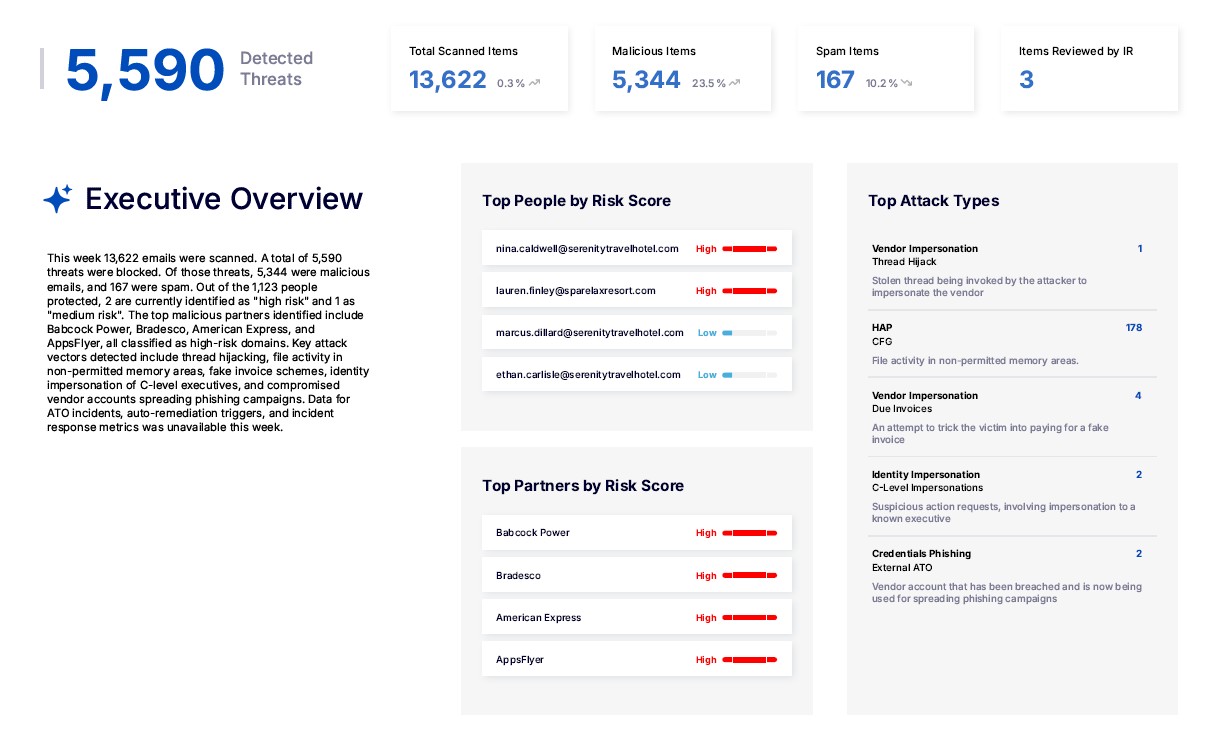
The Executive Overview page shows a high-level overview of the scans that were performed in your organization during the specified week.
-
The Executive Overview page is always included in all Weekly Management reports.
|
For some of the items below, an arrow shows if the total was greater-than [ |
|
|
Detected threats |
The total number of threats that were detected during the specified week. The total includes all scans in all protected channels, and with malicious, spam, and restricted scan verdicts. The value also includes the number of ATO events detected. |
|
Total scanned items |
The total number of items that were scanned during the specified week. The total includes all scans in all protected channels, and all scan verdicts. |
|
Malicious items |
The number of scans with malicious verdicts - that were performed during the specified week - in all active channels. |
|
Spam items |
The number of scans with spam verdicts - that were performed during the specified week - in all active channels. |
|
Items reviewed by IR |
The number of scans that were reviewed by IR during the specified week - in all active channels. |
|
Executive overview |
An AI generated executive overview of the scans that were performed during the specified week. |
|
Top people by risk score |
The people in the organization who have the highest risk scores. For details about user-based risk scores, see People Posture. |
|
Top partners by risk score |
The partners in the organization that have the highest risk scores. For details about partner-based risk scores, see Partner Posture. |
|
Top attack types |
The attack types that were most frequently detected by FortiMail Workspace Security during the specified week. |
 ] or less-than [
 ] the total for the previous week - and the percentage change is also shown.
Weekly Management Report - People and Partner Posture Summary
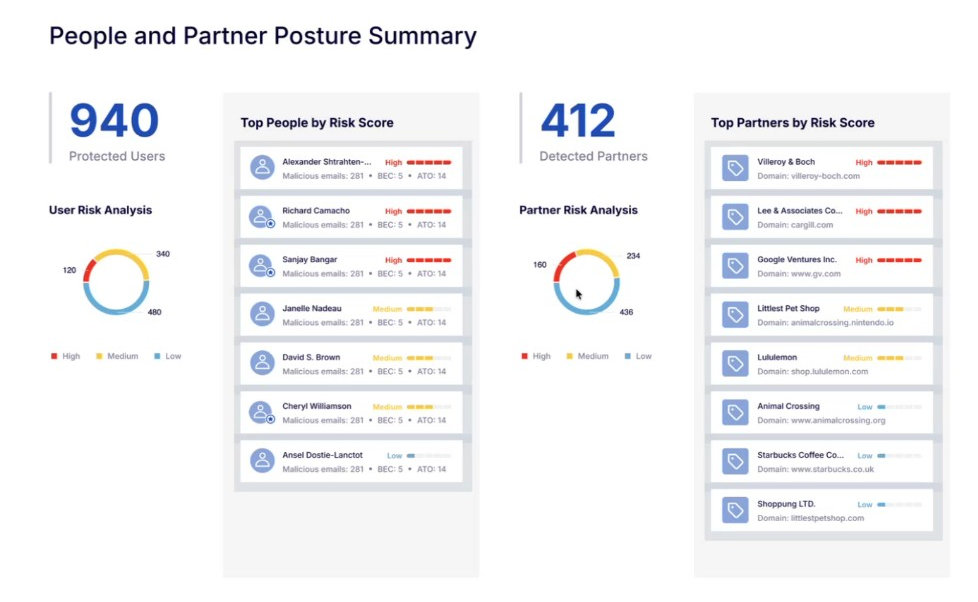
The People and Partner Posture Summary page shows a high-level overview of the protected users and detected partners in your organization during the specified week.
-
The People and Partner Posture Summary page is always included in all Weekly Management reports.
|
|
|
|
Protected users |
The total number of users that are protected by FortiMail Workspace Security. |
|
User risk analysis |
The number of protected users with high, medium, and low risk scores. For details about user-based risk scores, see People Posture. |
|
Top people by risk score |
The people in the organization who have the highest risk scores. |
|
Detected partners |
The number of partners that were detected during the specified week - in all active channels. |
|
Partner risk analysis |
The number of detected partners with high, medium, and low risk scores. For details about partner-based risk scores, see Partner Posture. |
|
Top partners by risk score |
The partners in the organization who have the highest risk scores. |
Weekly Management Report - Account Takeover (ATO) Protection
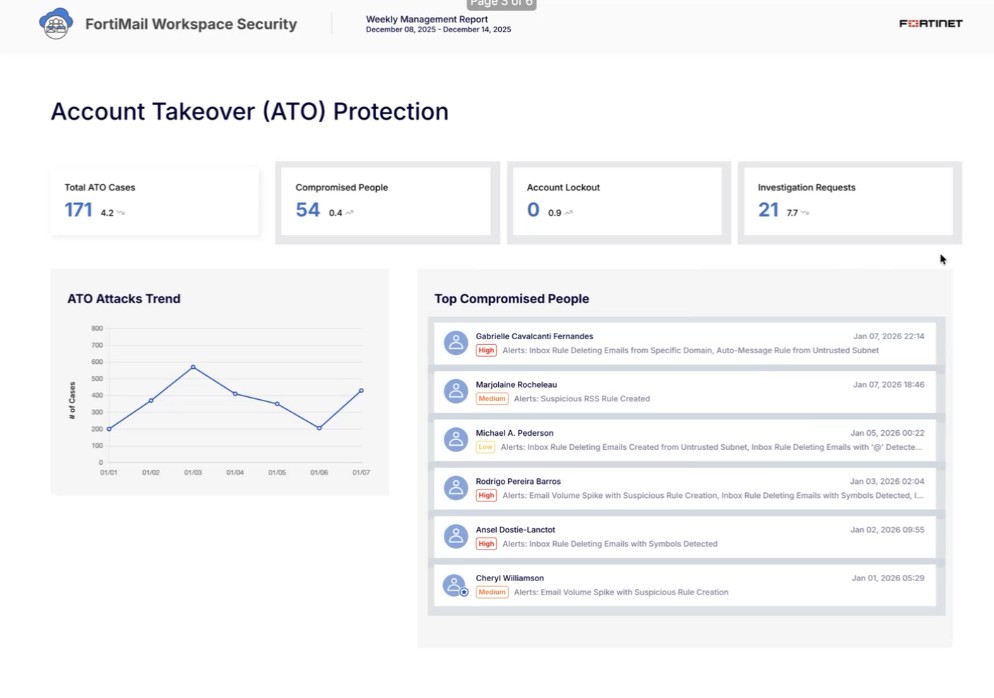
The Account Takeover (ATO) Protection page shows a high-level overview of the account takeover cases that were opened in your organization during the specified week.
-
The Account Takeover (ATO) Protection page is included in Weekly Management reports only for organizations that have a Microsoft 365 [Inline or API] integration, and in which at least one ATO case was opened during the specified week.
|
For some of the items below, an arrow shows if the total was greater-than [ |
|
|
Total ATO cases |
The total number of ATO cases that were opened during the specified week. |
|
Compromised people |
The number of people that were detected to have been compromised during the specified week. |
|
Account lockout |
The number of account lockouts that were detected during the specified week. |
|
ATO attacks trend |
The number of ATO cases opened each day during the specified week. |
|
Top compromised people |
The people for whom the most ATO cases were opened - during the specified week. |
Weekly Management Report - Highlighted Email Scan
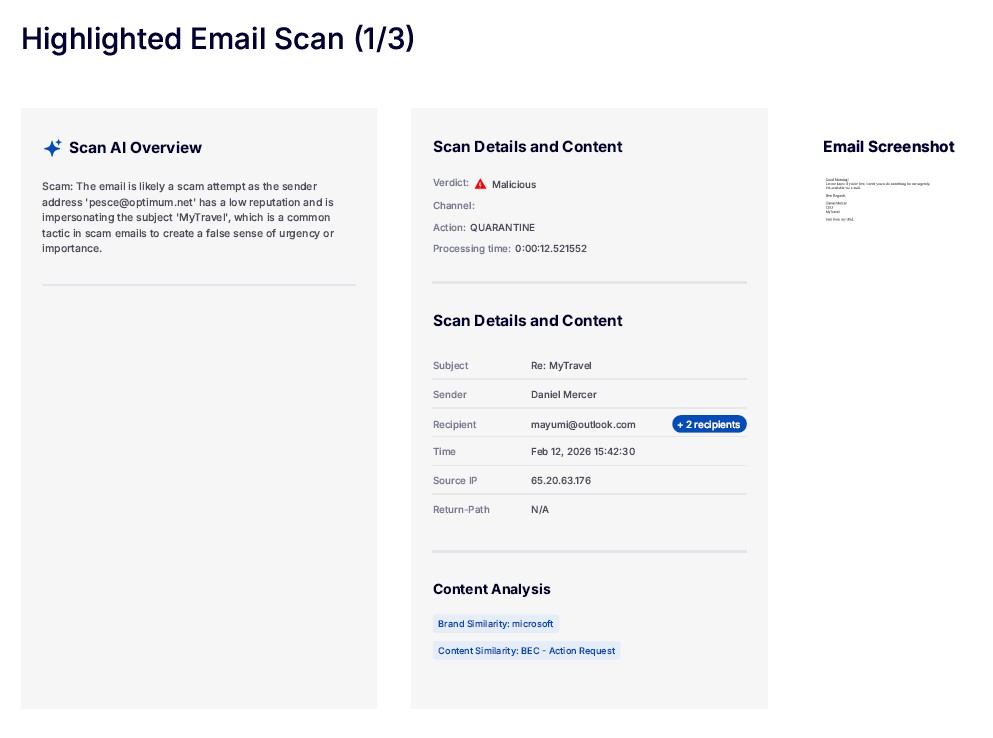
Each Highlighted Email Scan page shows details of an email that was scanned during the specified week, and that has been highlighted. For information about highlighting scans, see Highlighted.
-
Highlighted Email Scan pages are included in Weekly Management reports only if there are emails that were scanned during the specified week, and some of these scans have been highlighted. A maximum of three Highlighted Email Scan pages are included in the report. The most recent highlighted scans are included.
|
|
|
|
Scan AI overview |
An AI generated overview of the scan. |
|
Security analysis |
Not shown. Summary of some of the significant security issues detected in the email. |
|
Scan details and content |
Details of the scan. |
|
Email content |
Details of the email content. |
|
Content analysis |
Brief content analysis. |
|
Email screenshot |
A screenshot of the email. |
See also:
