This section includes:
About threat intelligence
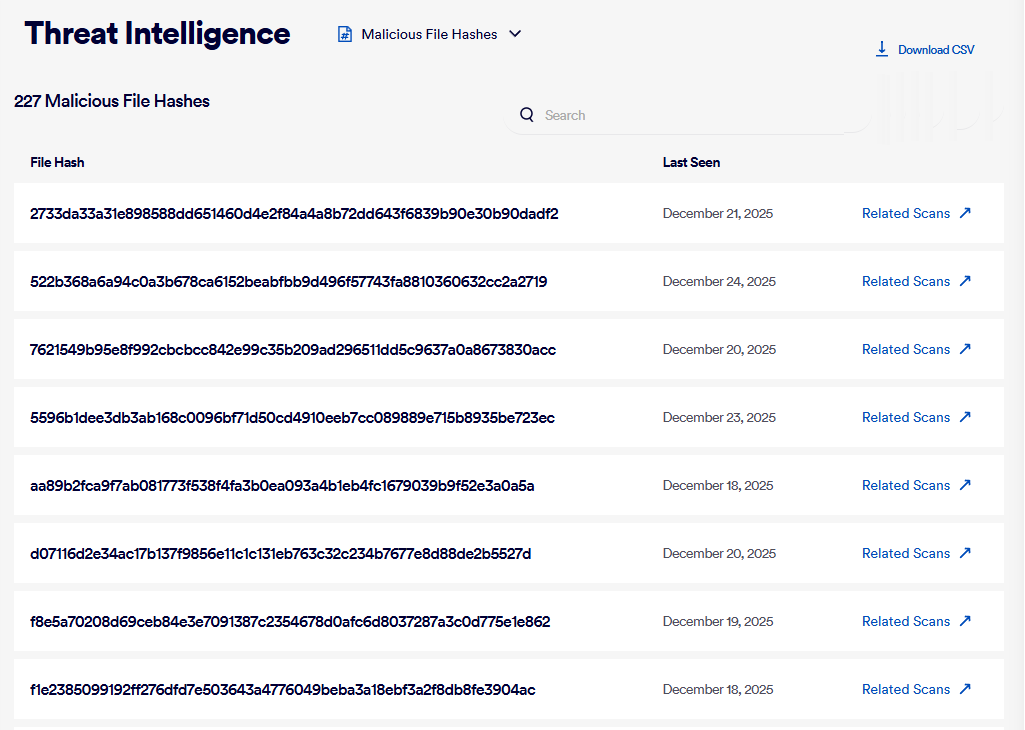
As FortiMail Workspace Security performs scans in your organization, it may detect malicious files. The Threat Intelligence page shows a list of file hashes of various files that have been detected to be malicious. You can export [download] a list of these file hashes in .csv format. Thereafter, you can import the .csv file into applications such as FortiAnalyzer or FortiSIEM.
Which malicious file hashes are included
To each malicious file that is detected, FortiMail Workspace Security assigns a threat confidence level. This is an indicator of the confidence that FortiMail Workspace Security has that the file is malicious. Confidence levels can be low, medium, or high - based on a proprietary confidence-level scoring algorithm. The Threat Intelligence page shows only those file hashes that have a high confidence level.
-
The confidence level is not shown in the Threat Intelligence page, but it does appear when you export the threat intelligence data to a .csv file.
-
The entries in the Threat Intelligence page appear in order of "Last Seen" - the date and time when the malicious file was most recently scanned and found to be malicious. The order of appearance can't be changed.
-
The Threat Intelligence page includes hash values for files that were last detected in the previous 30 days.
-
Data in the Threat Intelligence page is updated every 24 hours - at 6:00 UTC.
Accessing the Threat Intelligence page
To access the Threat Intelligence page:
-
In FortiMail Workspace Security, select Detection Setup > Threat Intelligence.
|
The Threat Intelligence page is available to admin users that have the role Cyber Analyst or above. |
Showing related scans
On the right of each entry in the Threat Intelligence page is a "Related Scans" link. When you click the link, FortiMail Workspace Security will open the Scans page, and show all the scans that include the selected file hash.
Downloading threat intelligence data
You can export [download] a list of file hashes that appear in the Threat Intelligence page - in .csv format. Thereafter, you can import the .csv file into applications such as FortiAnalyzer or FortiSIEM for further processing.
In addition to the data that is displayed in the Threat Intelligence page, each downloaded .csv file includes the following additional data for each entry:
-
Confidence level: An indicator of the confidence that FortiMail Workspace Security has that the file is malicious.
-
First scan: When the file was first scanned and found to be malicious.
When you filter the file hashes that are shown in the Threat Intelligence page, the downloaded .csv file will include only those file hashes that appear with the applied filter.
To download threat intelligence data:
-
In the top-right of the Threat Intelligence page, click Download CSV.
Origins of the threat intelligence data
The data that appears in the Threat Intelligence page may originate in a scan that occurred in any of the FortiMail Workspace Security integration channels - such as an email integration or a Microsoft Teams integration.
Filtering the displayed threat intelligence data
You can use the "Search" control to filter the file hashes that appear in the Threat Intelligence page.
|
Note: The Search functionality will include only those file hashes that start with the text that you specify in the "Search" control. File hashes that include the text that you specify inside the hash value will not be included in the filter. |
See also:
