IMPORTANT: This page is currently under construction.

This section includes:
About scan details
This page describes the "Compact" view that is available in the Scans page.
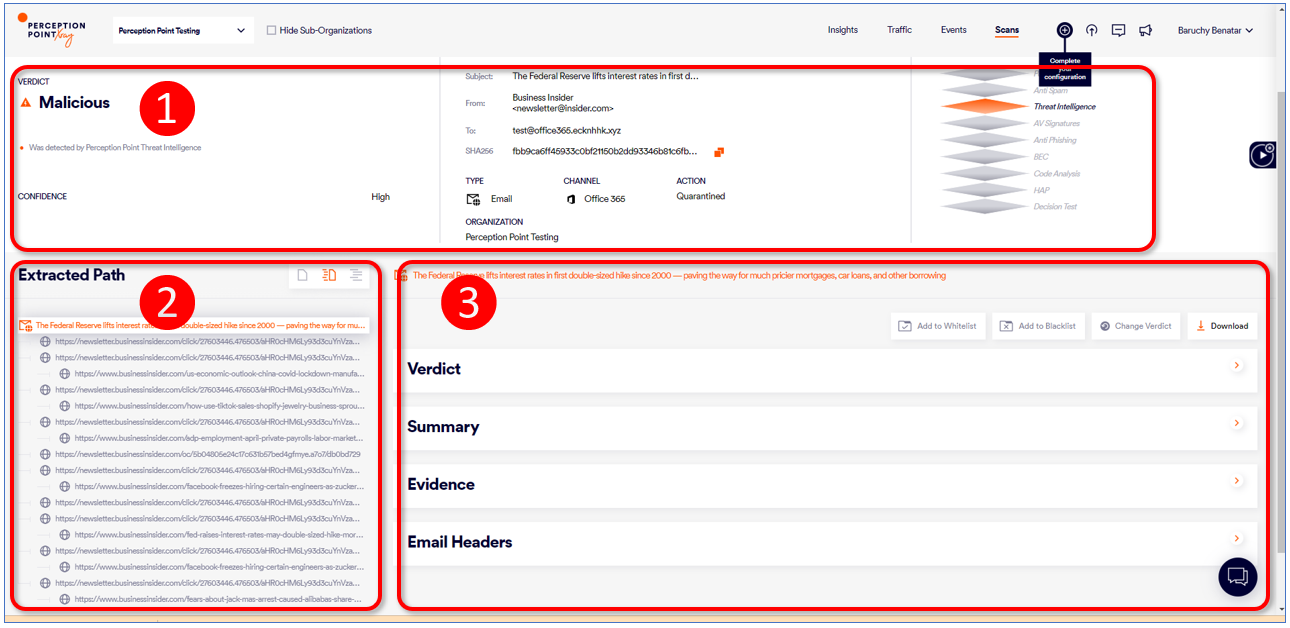
The Scans-details page lets you perform a detailed forensic analysis of any scan, allowing you to understand the high-level conclusion, as well as to quickly navigate to a malicious URL or a malicious file. The Scans-details page is split into the following sections:
|
|
Emails |
Files |
|---|---|---|
|
|
Scan overview |
Scan overview |
|
|
Email content |
File Scan Information |
|
|
Links and Attachments |
|
|
Any admin user with the "Self Analysis" role [or higher] can access the Scans-details page. |
1. Scan overview
The top part of the Scans-details page contains a summarized view of the scan. It includes an AI-generated summary of the scan, a security analysis, and details of the scan.
In addition, some of the following buttons will be displayed:
-
Change verdict
-
Ask IR
-
Scan History
-
Download
-
More actions > Release from Quarantine [Appears for email-scans only]
-
More actions > Highlight
-
VirusTotal [Appears for file-scans only]
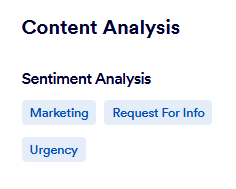
Sentiment Analysis
The scan results that you display in the Compact view of the Scans page may include a "Sentiment Analysis" section. The "Sentiment Analysis" section appears under Email Content > Content Analysis.
|
Note: The Sentiment Analysis section is displayed only in the Compact view of the Scans page, not in the Detailed view. |
The Sentiment Analysis section consists of one-or-more "sentiment tags" - such as Marketing, Urgency, or Request for info.
-
Each sentiment tag represents a sentiment that was detected in the email.
-
Each scan result can be assigned multiple sentiment tags.
-
There is no fixed set of sentiment tags.
-
The Sentiment Analysis section is not displayed for all scans - it appears only for scans that FortiMail Workspace Security suspects may contain BEC (or similar) attacks.
-
The detected sentiments are based on the actual content of the email - not on the content of any attachments.
Supported languages
Email content in a fixed set of languages is analyzed for sentiment:
 Supported languages
|
|
|
Email Classification
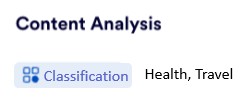
FortiMail Workspace Security can classify each scanned email according to a fixed set of classifications. The classification consists of one-or-more "classification tags" - such as Health, Travel, or Sales offers. The classification that is assigned to each email appears in the Compact view of the Scans page. The assigned classification appears under Email Content > Content Analysis.
|
Note: The Classification section is displayed only in the Compact view of the Scans page, not in the Detailed view. |
The Classification consists of one-or-more "classification tags" - such as Health, Travel, and Sales offers.
-
Each classification tag represents a classification that was detected in the subject of the email. The content and attachments are not analyzed. Only English words are included in the analysis. Signs and emojis are not included in the analysis.
-
Each scan can be assigned multiple classification tags. If no classification is detected, then no classification tag is assigned to the email, and the Classification section doesn't appear in the Scans page.
-
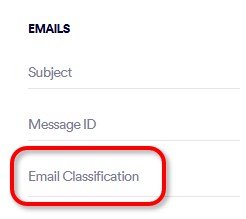
You can use the Emails > Email Classification advanced filter to display only those scans with a specified classification. [See Advanced filters]
Classification tags
The following fixed set of classification tags is available:
Classification tag set
-
Chat notifications
-
Education and training
-
Health
-
IT
-
Newsletter
-
Orders
-
Personal finance
-
Sales offers
-
Travel
-
Webinars/courses
Displaying email classifications
Email classifications can appear in the following places in FortiMail Workspace Security:
-
The classification tags that are assigned to each email appear in the Compact view of the Scans page. The assigned classification tags appears under Email Content > Content Analysis.
-
A list of the "Top Email Classifications" can be displayed in the Incidents page. [See Incidents]
See also:
