During or after onboarding a Google Workspace Inline integration for a PoC installation, you can modify the set of users that are protected - called partial account protection. This is done by modifying the redirect rule, as described below.
|
Important: Partial account protection described on this page should be used for Google Workspace Inline POC installations only. If partial account protection is configured for an organization with a Google Workspace Inline Commercial contract type, then billing will be based on the number of licenses that are included in the Google Workspace account - not on the number of "partial protection" users. Partial account protection is possible for Google Workspace API integrations - both POC and Commercial. |
-
Specifying which users to protect [Google Workspace]
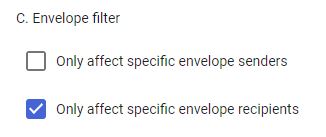
Under Envelope filter, select Only affect specific envelope recipients.
-
From the drop-down menu that appears below, select one of the following 3 options:
[This defines the users that will be protected by FortiMail Workspace Security.]
Applies to
Instructions
Pattern match
Domains and email addresses
Enter the domains or email addresses to protect.
Note: Make sure to use lower-case letters to specify the domains and email addresses. For example, specify "acme.com" and not "ACME.COM"
-
Multiple domains: Add the domains with a pipe symbol ["|"] between them, and without spaces between them.
-
Multiple email addresses: Add the email addresses with a pipe symbol ["|"] between them, and without spaces between them.
Group membership
Email groups
Click Select groups and then select the required group or groups to protect.
Single email address
A single email address
Enter the required [single] email address to protect.
Note: The email address is case-sensitive. To bypass the case-sensitivity, you can add (?i) before the email address. For example:
(?i)peter@acme.com
 See the available video.
-
-
Click Save.
-
See also: