This section includes:
About the Email Thread Hijacking page
Email thread hijacking occurs when an attacker inserts themselves into an existing conversation - often via a lookalike email address or a compromised account - so recipients believe they're still communicating with a legitimate business partner.
The Email Thread Hijacking page shows a list of emails that were scanned and an email thread hijacking attack was detected during the scan. The list is displayed in chronological order, with the most recent emails at the top of the list.
Select any scan in the list to show email thread hijacking-related details of the scan. An AI-generated overview of the attack is also displayed. To display details of the scan in the Scans page, click "Email Scan" in the top-right corner of the page.
Accessing the Email Thread Hijacking page
To access the Email Thread Hijacking page:
-
In FortiMail Workspace Security, select Security Operations > Email Thread Hijacking.
|
The Email Thread Hijacking page is available to admin users that have the Admin role only. |
Analyzing the sender email addresses
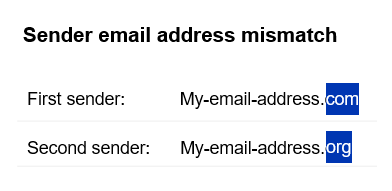
Each detected email thread hijacking attack typically includes senders with similar - but not identical - email addresses. To see the sender addresses detected in a scanned email, locate the "Sender email address mismatch" section, where the differences between the "First sender" and "Second sender" are highlighted.
Using the sender addresses
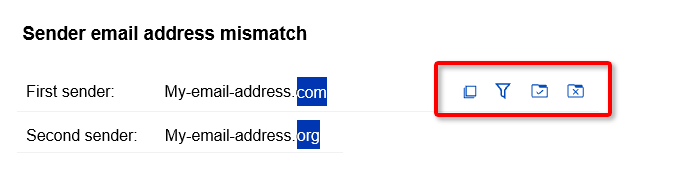
The controls to the right of each detected sender address let you:
|
|
Copy value to clipboard |
Copies the sender address to the clipboard. |
|
|
Find similar |
Opens the Scans page in a new tab, filtered to show only the scans that include the selected sender address. |
|
|
Add sender to allow list |
Opens the "Add Sender Email to Allowlist" pane, where you can add the sender to the allow list. |
|
|
Add sender to block list |
Opens the "Add Sender Email to Blocklist" pane, where you can add the sender to the block list. |


See also:
