|
Note: Before implementing any of the FortiMail Workspace Security API functionality, contact your Account Manager for FortiMail Workspace Security to make sure that the API functionality is included in your license. |
This page includes the following topics:
About the list API
The list API lets you generate a list of the scans that have been performed - where the listed scans meet the criteria that you specify.
The list API can be used to integrate FortiMail Workspace Security scan results with SIEM tools, such as FortiSIEM, Splunk, and QRadar. For more information, see SIEM integration.
For authentication requirements, and other details about the Fortinet API, see API Authentication.
|
Note: Before implementing any of the FortiMail Workspace Security API functionality, contact your Account Manager for FortiMail Workspace Security to ensure that the API functionality is included in your license. |
API Endpoint
|
GET <PERCEPTION-POINT-URL>/api/v1/scans/list/ |


|
What's the environment of your organization 
|
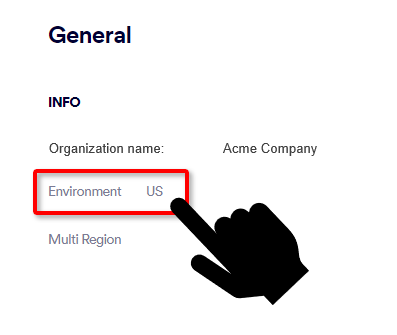
For additional information about formatting the above endpoint, see API URL format.
Available fields
|
Field name |
Field description |
Mandatory |
Field type |
|||||
|---|---|---|---|---|---|---|---|---|
|
start |
Lower bound for scan creation time (Inclusive). |
No |
10-digit epoch timestamp |
|||||
|
end |
Upper bound for scan creation time (Inclusive). |
No |
10-digit epoch timestamp |
|||||
|
organization_id |
Filters sub-organization id only. |
No |
||||||
|
origin |
|
No |
||||||
|
belongs_to_vip |
Search for VIP user incidents. |
No |
||||||
|
verbose_verdict |
The verdict of the main [parent] scans. May be any one of the following 3-letter options:
|
No |
||||||
|
handle_status |
The current IR handling status. |
No |
||||||
|
search_descendants.subject |
The subject of the email. |
No |
||||||
|
search_descendants.original_message_id |
Message ID * * Make sure to encode all special characters that are included in the Message ID. |
No |
||||||
|
verbose_action |
One of the following:
|
No |
||||||
|
sample_from |
The sender's email address. |
No |
||||||
|
search_descendants.sender_domain |
Sender domain |
No |
||||||
|
search_descendants.source_ip |
Sender IP |
No |
||||||
|
search_descendants.reply_to |
Reply-To address |
No |
||||||
|
search_descendants.source |
Return-path |
No |
||||||
|
receiver_address |
The address of the email recipient. |
No |
||||||
|
sample.to_users.un_region |
Region |
No |
||||||
|
sample.to_users.country |
Country |
No |
||||||
|
search_descendants.receiver_domain |
Receiver domain |
No |
||||||
|
search_descendants.original_file_path |
folder |
No |
||||||
|
search_descendants.envelope_to |
Envelope-To |
No |
||||||
|
max_group_size |
Maximum campaign size. |
No |
||||||
|
search_descendants.original_file_name |
The name of the file that was scanned. |
No |
||||||
|
search_descendants.original_type |
The type of the file that was scanned. |
No |
||||||
|
search_descendants.sample_sha256 |
File / URL Sha256 hash. |
No |
||||||
|
search_descendants.mime_type |
File Mime type. |
No |
||||||
|
search_descendants.path |
The URL path that was scanned. |
No |
||||||
|
search_descendants.domain |
Domain |
No |
||||||
|
search_descendants.url_title |
Webpage title |
No |
||||||
|
search_descendants.url_description |
URL description |
No |
||||||
|
evidence.data.brand |
Brand name |
No |
Usage
Some of the API fields can have multiple values. In order to use multiple values, append [] to the end of the field name.
-
The OR condition is applied between options of the same field.
-
The AND condition is applied between fields.
200 OK
Examples
-
Get all scans from 01.07.2021:00:00:00 until 08.07.2021:03:00:00
GET /api/v1/scans/list/?start=1625097600&end=1625713200
-
Get all the scans from the email channel:
GET /api/v1/scans/list/?channel=email
-
Get all scans from the email and api channels:
GET /api/v1/scans/list/?channel[]=email,api
-
Get all highlighted clean scans from the email and api channels:
GET /api/v1/scans/list/?channel[]=email,api&is_highlighted=true&verbose_verdict=CLN
-
Get all malicious scans for a specified week:
GET /api/v1/scans/list/?verbose_verdict[]=MAL&start=1722527805&end=1723132605
See also:
